


ProjectsLinux Desktop / AI Assistant
Isle - Dynamic Island for GNOME Linux
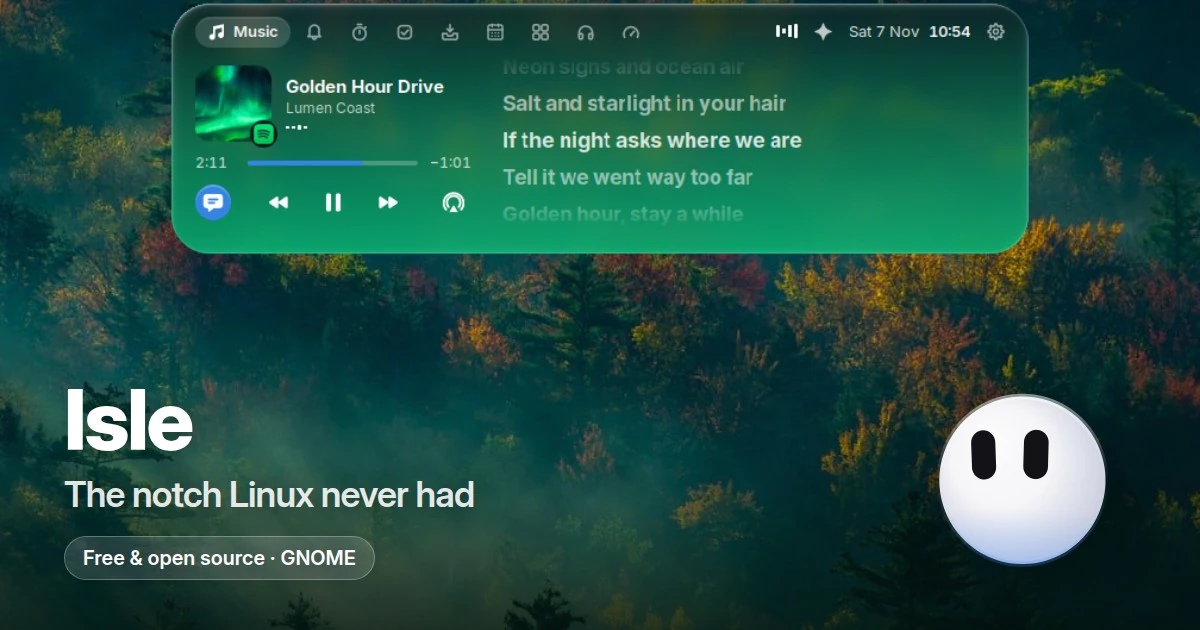
An open-source, notch-style dynamic island for the GNOME desktop: music with synced lyrics, calls, notifications, a focus timer, calendar, clipboard shelf, and a voice AI assistant that installs and fixes things, all living in the top bar.
My Role
- 01Created Isle end to end, from the product spec for the island's sizes, motion, pages, and alerts to every release.
- 02Architected the split between a Rust D-Bus service (isled) that holds all the logic and a GNOME Shell extension in JavaScript that only draws the island and its spring animations.
- 03Built the voice assistant's agent loop, tools, and safety rules, integrating Claude Code, Codex, Grok, opencode, and Antigravity with on-device whisper.cpp speech recognition.
- 04Implemented the music, synced lyrics, calendar, focus timer, shelf, AI usage, and AI agent approval features, plus the GTK 4 drag-and-drop helper and local-network phone sharing.
- 05Shipped versioned releases with a one-line installer, .deb, .rpm, and Arch packages, and built the Next.js landing page with a live in-browser demo of the island.
- 06Maintain the open-source project: triaging issues and reviewing and merging pull requests from a handful of community contributors.
Features
- 01Notch-style island in the GNOME top bar that shows the time and what is going on at rest, and opens with spring physics into a tabbed panel when the pointer rests on it.
- 02Music page for Spotify, browsers, and any MPRIS player, with synced lyrics from LRCLIB that widen the island and tint it with the cover's colour.
- 03Voice assistant (Super+I) in English or Indonesian that works as an agent: multi-step requests run one step at a time, each step checked, using the AI the user already has (Claude Code, Codex, Grok, opencode, or Antigravity).
- 04Installs and fixes software: detects the distro and package managers, proposes one command with clear warnings, runs it only after the user presses Run, and verifies it worked before saying so.
- 05AI agent approvals: answer Claude Code and Codex permission requests (Deny, Allow, Always) from the island, plus Claude and ChatGPT plan usage limits with reset times.
- 06Calls, notifications, a Pomodoro focus timer with Do Not Disturb, reminders, and a calendar that offers Join for Google Meet, Zoom, Teams, and Webex meetings.
- 07Clipboard and files shelf with search, filters, and pins, plus sharing files with a phone over the local network by scanning a QR code.
- 08Alerts for volume, brightness, Caps Lock, charging, Bluetooth battery, and notifications in the island instead of the middle of the screen, with black notch, pill, and glass looks.
Impact
- Helps Linux users install, debug, and fix software just by asking: the assistant checks their distro and what is already installed, reads the vendor's instructions when unsure, and confirms the fix actually worked, so they no longer copy-paste commands from forums.
- Explains problems in plain language, such as why the laptop is slow or why an app will not install, using read-only checks of the system before suggesting anything.
- Makes it safe to let AI touch the computer: nothing changes until the user presses Run on a command they can read, risky steps (root password, scripts from the web, deleting files) are flagged, and destructive ones are refused outright.
- Keeps developers in flow by answering Claude Code and Codex permission requests, tracking AI plan limits, and joining meetings straight from the top bar, without switching windows.
- Turns everyday desktop chores into one spoken sentence in English or Indonesian, from tiling windows side by side to finding a file or adding a reminder, with every step checked before it says done.
- Light and private enough to run all day: about 10 MB of memory and 0% CPU when idle, no server or telemetry, and speech transcribed on-device; it reached 200+ GitHub stars and 40+ forks within weeks of launch.
Stack
RustTokioD-Bus (zbus)GNOME Shell (GJS)JavaScriptGTK 4whisper.cppsystemdNext.jsTypeScript
Notes
Requires GNOME Shell 46 to 51 on a 64-bit (x86_64) PC. Install with curl -fsSL https://raw.githubusercontent.com/zickrian/isle/main/get.sh | bash, then log out and back in.